
03 Scheduled Ticks and Scheduled Tick Components
This section explains how Scheduled Ticks and Scheduled Tick Components work.
Basic Section
- Concept and content of Scheduled Ticks
- Common Scheduled Tick Components
- Simple examples
Advanced Section
- Maintenance of Scheduled Tick queues
- Timing analysis of 4gt Observer high-frequency circuits
- In-depth analysis of Comparator Scheduled Tick execution logic
- Scheduled Tick suppression
1 Concept and Content of Scheduled Ticks
1.1 What is a Scheduled Tick?
In Minecraft, many redstone components don't change immediately after being triggered, such as repeaters and comparators. These components always change state after a delay.
Here's a real-world analogy. In the morning, you receive an email, so you plan to handle it in the afternoon and set an alarm. When afternoon comes, the alarm rings, you remember you need to handle the email, so you open your inbox and start processing it.
Note: This "alarm" carries no notes or labels. It only reminds you on your phone, at the correct time, that "something needs doing". As for what specifically needs to be done, the alarm doesn't care. This alarm contains only these elements:
- When to ring
- Which alarm number this is
- How important it is
- On whose phone it rings
- Who to remind
A Scheduled Tick works like this alarm. When a redstone component is triggered, it adds a Scheduled Tick for itself. When the Scheduled Tick executes, it's like the alarm ringing, and the redstone component changes state.
Redstone components whose behavior is controlled by Scheduled Ticks are called Scheduled Tick Components.
1.2 Content of Scheduled Ticks
Like the alarm above, a Scheduled Tick contains only these elements, which we call the information structure of a Scheduled Tick:
- Execution time
triggerTick: when to execute, or how long to delay before execution1 - Sub-order
subTickOrder: the order in which Scheduled Ticks are added - Priority
priority: how high the Scheduled Tick's priority is - Position
pos: the coordinates where execution occurs - Block type
type: which block type executes this Scheduled Tick
Position and block type are straightforward attributes. A block's own Scheduled Tick cannot be executed by other blocks (unless you happen to push it away or break and replace it with another block before it executes its Scheduled Tick), nor can it execute somewhere else in the world.
Execution time refers to when the Scheduled Tick executes at the macro timing level, i.e., which gt the Scheduled Tick should run in. For example, when a repeater set to 1 tick is triggered, it adds a Scheduled Tick for 2gt later, and after 2gt, that Scheduled Tick will execute. What we commonly call "the delay of a Scheduled Tick component" refers to how many gt later the Scheduled Tick executes.
Sub-order refers to the order in which Scheduled Ticks are added at the same time. For example, within the same gt, repeater A is triggered first and repeater B is triggered later. Then, in the sub-order, repeater A comes before repeater B.
Priority is an integer from -3 to 32, where smaller values mean higher priority. That is, within the same gt, a Scheduled Tick with priority -3 always executes before those with priority -2, -1, or 0.
When discussing priority, "higher priority" and "lower priority value" mean the same thing. To avoid ambiguity caused by the concept of "priority" and "priority value", we recommend readers use "a certain component's Scheduled Tick is more prioritized" when explaining to others.
Similarly, just like the alarm above: A Scheduled Tick is just an "alarm reminding the block that something needs to be done". It doesn't care what the block actually does. All behavior when executing a Scheduled Tick is controlled by the block itself; "the behavior of executing a Scheduled Tick" is not part of "the information structure of a Scheduled Tick".
When we say "a certain component already has a Scheduled Tick", we mean that at the current position, there exists an unexecuted Scheduled Tick with the same block type as the current block.3
1.3 Execution Order of Scheduled Ticks
In the previous two articles, we learned about macro timing analysis and became familiar with micro timing. We know that macro timing always takes precedence over micro timing, and the same applies to Scheduled Ticks. For Scheduled Ticks with different execution times, those with earlier execution times always execute first. For Scheduled Ticks with the same execution time, those with higher priority always execute first. For Scheduled Ticks with the same priority, those added earlier (smaller sub-order values) always execute first.
Therefore, when comparing the execution order of Scheduled Ticks, we can follow this logic:
- Compare macro timing: earlier macro timing executes first.
- Compare Scheduled Tick priority: higher priority executes first.
- Compare Scheduled Tick addition order (sub-order): earlier addition executes first.
This is like comparing numbers: macro timing is the hundreds place, priority is the tens place, and addition order is the ones place.
1.4 Example of Scheduled Tick Order
Now, let's look at a practical example.
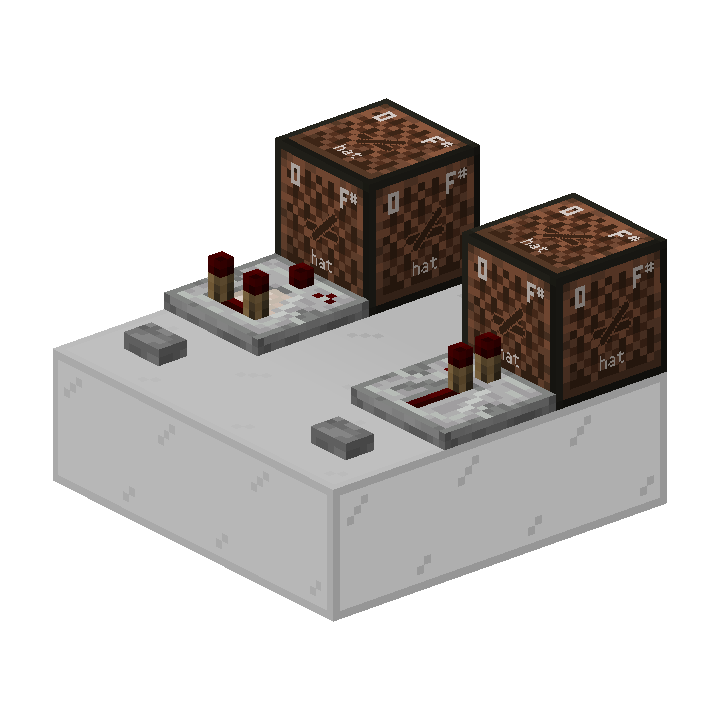
Given the situation shown in the diagram, the comparator has priority 0 and the repeater has priority -1. Both the comparator and repeater have a delay of 2gt.
- If triggered in different game ticks, you press the comparator's button first, then press the repeater's button. Which note block will sound first?
- If triggered in the same game tick, you press the comparator's button first, then press the repeater's button. Which note block will light up first?
Answers:
- The comparator lights up first. In macro timing, the comparator is triggered first, and then after a certain number of gt, the repeater lights up.
- The repeater lights up first. In terms of Scheduled Ticks, although the comparator adds its Scheduled Tick before the repeater, the repeater's priority is -1, which is more prioritized than the comparator's priority 0. Since Scheduled Tick priority takes precedence over Scheduled Tick addition order, the repeater lights up first.
2 Common Scheduled Tick Components
2.1 Repeater
Repeaters and comparators are collectively called Redstone Diodes or Redstone Gates.4
In Tick and Inter-Tick Timing, we already introduced repeaters and comparators. Now, let's examine the Scheduled Tick behavior of repeaters in more detail.
If a repeater is locked, it will not add a Scheduled Tick, nor will it change state when executing a Scheduled Tick. If a repeater is not locked, it has the following behaviors:
Adding Scheduled Tick behavior:
- When a repeater receives an NC update, it checks its own state. If it does not have a Scheduled Tick and should change state (i.e., it is not lit but has a redstone signal at the input, or it is lit but has no redstone signal at the input), then it adds a Scheduled Tick.
- All Scheduled Ticks added by repeaters have a delay of
repeater delay * 2 gt, except for the following case: - When a repeater is placed, it checks its own state, and if it should change state, it adds a Scheduled Tick for 1gt later.
Executing Scheduled Tick behavior:
- If the repeater is lit, it immediately turns off.
- If the repeater is not lit, it immediately lights up. This step is not affected by the input signal.
- If there is no input signal at this time, it adds another Scheduled Tick (for turning off).
For example:
For instance, if a repeater set to 2 ticks receives a signal with duration <= 4gt5, the repeater's behavior is as follows:
- Receives NC update, adds Scheduled Tick
- After 4gt, executes Scheduled Tick
- Detects that it is not lit, so it immediately lights up
- Detects that there is no redstone signal at the input, adds Scheduled Tick (for turning off)
- After another 4gt, executes Scheduled Tick
- Detects that it is lit, so it immediately turns off
This example covers all Scheduled Tick behaviors of a repeater.
Special priority changes:
- If a repeater points to a horizontally placed redstone diode or points to the input of a redstone diode, the Scheduled Tick's priority is
-3. - Otherwise, if the repeater is in a lit state when adding a Scheduled Tick (i.e., this Scheduled Tick is for turning off), the Scheduled Tick's priority is
-2. - Otherwise, the Scheduled Tick's default priority is
-1.
2.2 Comparator
Adding Scheduled Tick behavior:
- When a comparator receives an NC update, it checks its own state. If it does not have a Scheduled Tick and should change state (i.e., it is not lit but has a redstone signal at the input, or it is lit but has no redstone signal at the input), then it adds a Scheduled Tick.
- All Scheduled Ticks added by comparators have a delay of
2gt, except for: - When a comparator is placed, it checks its own state, and if it should change state, it adds a Scheduled Tick for 1gt later.
Executing Scheduled Tick behavior:
When a comparator executes a Scheduled Tick, it actually only does one thing:
- Update its own output power level based on the comparator's current input state and comparator mode.
The output power level refers to the output power level calculated by the comparator (specific calculation method described later). This update includes two things: updating the power level and sending updates. Moreover, for comparators, the output power level may appear unchanged from the outside, but in reality the comparator still "updates" its own output power level.
Comparators also have slightly more complex update behavior:
Comparator's update sending behavior:
- When executing a Scheduled Tick, if the comparator's powered property changes (i.e., it changes from off to lit, or from lit to off), it first sends an NC update, then sends a PP update.
- If the comparator is in compare mode, or the comparator is in subtract mode and its own output power level changes, it sends an NC update.
For example:
- First, this entire section assumes the comparator actually executed a Scheduled Tick:
- As long as the comparator is in compare mode, even if its output level doesn't change, including changing from 0 to 0, there will be one NC update.
- If the comparator's output power level changes from 0 (off) to 1, 2, 3, 4, 5...14, 15 (lit), or from lit to off, it will first send one NC update, then send one PP update, and finally send another NC update.
- If the comparator is in subtract mode, and its output power level changes from 1, 2, 3, 4, 5... to any other power level, there will only be one NC update.
These behaviors may be useful in some special wiring setups. If readers find this section difficult to understand, they can simply remember the most common uses of comparators: comparing signal sizes and determining whether to output, detecting container capacity, and subtract mode, or refer to the table.
Comparator Output Power Level Calculation
If the signal input is redstone dust or another comparator, the comparator inherits the input power.
If it's a container, refer to Comparator Signal Strength Calculation.
In particular, when there are both container signals and redstone signal inputs, the comparator will prioritize different signal inputs for calculation based on the situation. This phenomenon is also known as container shielding.
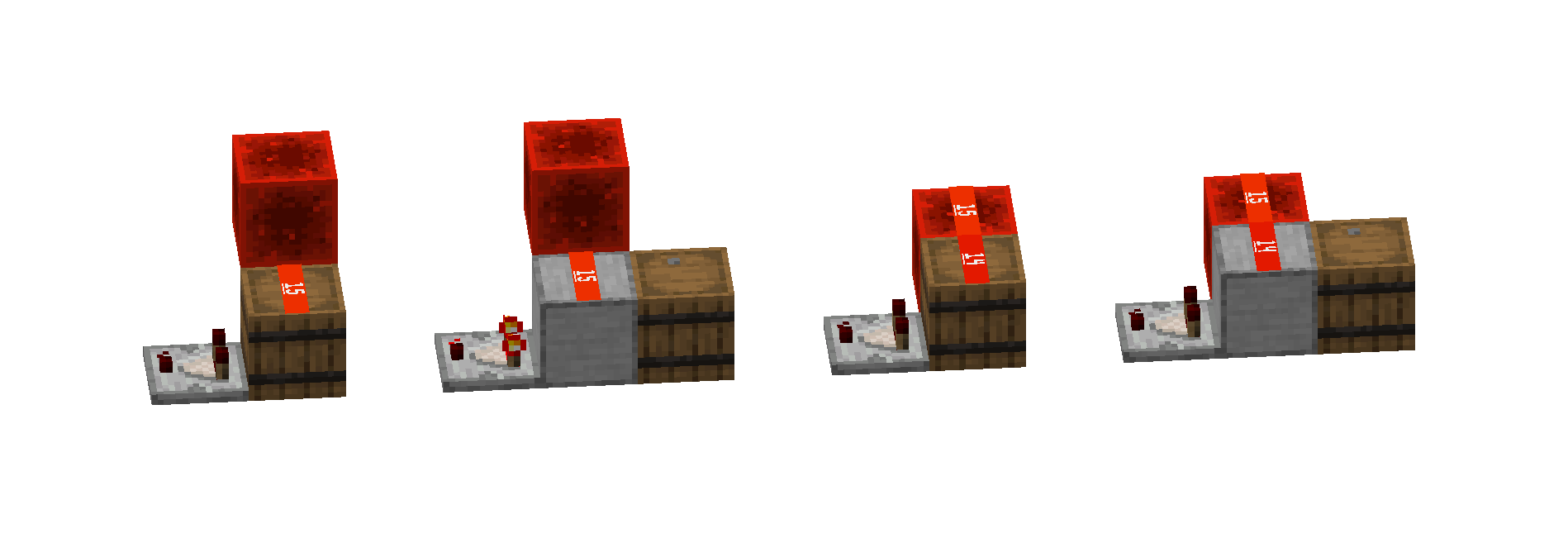
Special priority changes:
- If a comparator points to a horizontally placed redstone diode or points to the input of a redstone diode, the Scheduled Tick's priority is
-1 - Otherwise, the Scheduled Tick's default priority is
0
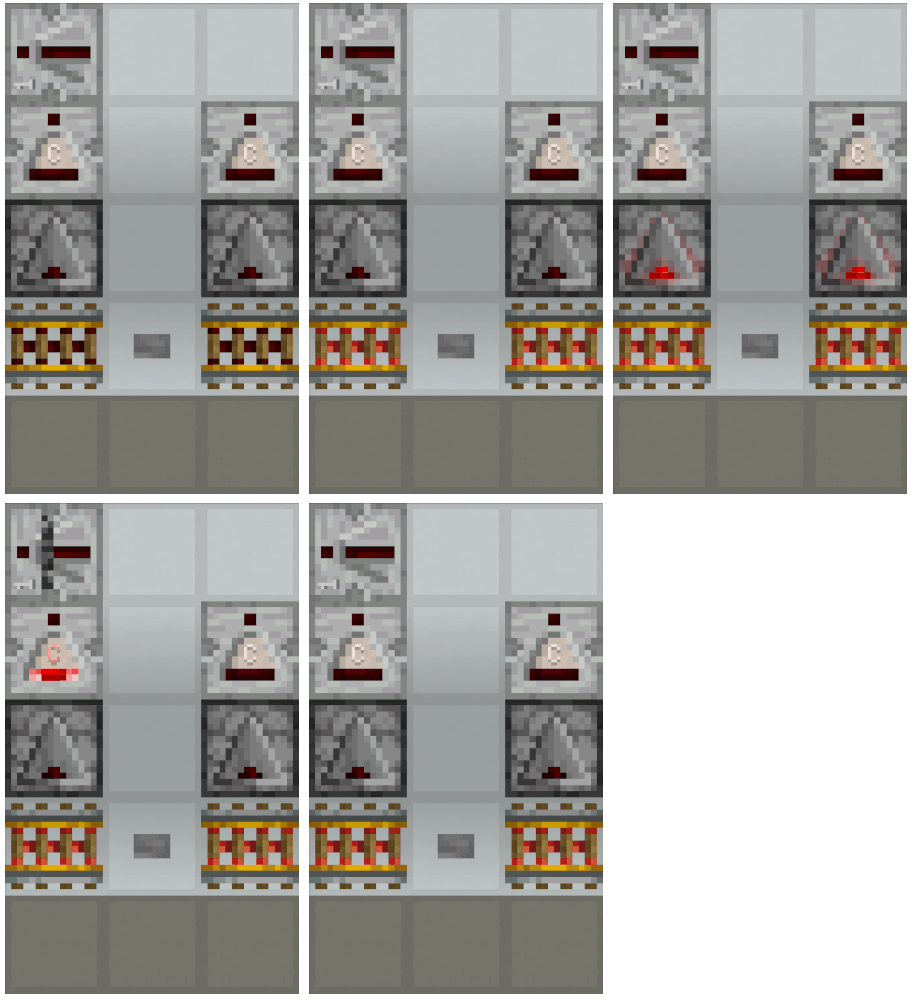
At this point, we can analyze the case from the previous chapter.
2.3 Observer
Adding Scheduled Tick behavior:
- After an observer receives a PP update from the block in front of it, if it is not lit and there is no Scheduled Tick for itself at the current position6, it adds a Scheduled Tick for 2gt later.
Executing Scheduled Tick behavior:
- If it is not lit, it lights up, sends a PP update, then adds a Scheduled Tick for 2gt later, and finally sends an NC update.
- If it is lit, it turns off.
2.4 Redstone Torch
Adding Scheduled Tick behavior
- After a redstone torch receives an NC update, if it is lit but should turn off and there is no Scheduled Tick for itself at the current position, it adds a Scheduled Tick for 2gt later.
Executing Scheduled Tick behavior
- If it is lit but should turn off, it turns off.
- If it burns out, it turns off7, and adds a Scheduled Tick for 160gt later.
- If it is off but should light up, and has not burned out, it lights up.
Should turn off/light up: Whether the block the redstone torch is attached to is a solid block and receives a redstone signal.
Burn out: If a redstone torch lights up 8 times within 60gt, it burns out.
After a redstone torch burns out, you can make it "light up" by breaking and replacing it with a new redstone torch, or wait until 160gt later for the torch to execute its Scheduled Tick and light up on its own.
3 Simple Scheduled Tick Timing Analysis
3.1 Can an Observer Turn Off a Redstone Torch?
Usually not. Let's briefly analyze this:
Both observers and redstone torches have a priority of 0. When an observer lights up, it first sends a PP update, then adds a Scheduled Tick, and finally sends an NC update. Redstone torches receive NC updates. The order of behaviors within Scheduled Tick execution and what updates a component receives fundamentally affect the following analysis. So assuming an observer is facing a solid block that a redstone torch is attached to, its Scheduled Tick order is as follows:
- Observer lights up:
- Sends PP update, nothing happens.
- Observer adds Scheduled Tick
- Sends NC update:
- Redstone torch receives NC update:
- Adds Scheduled Tick
- Redstone torch receives NC update:
2gt later:
- Observer executes Scheduled Tick, turns off.
- Redstone torch executes Scheduled Tick, at this time checks whether it should turn off, finds it should not turn off (because the observer turned off, the attached block is not powered), so it performs no action.
So in summary: the redstone torch finds there's no power when it's about to light up, so it does nothing.
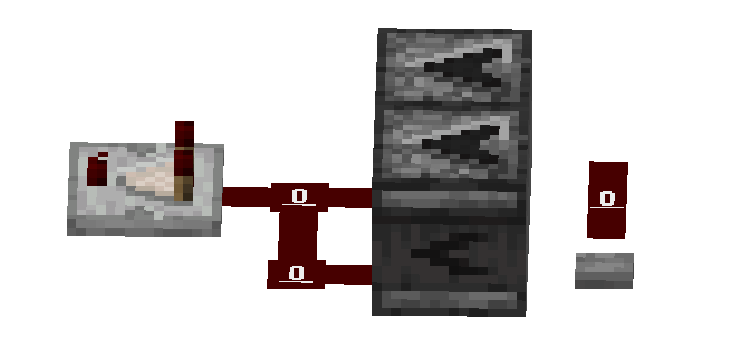
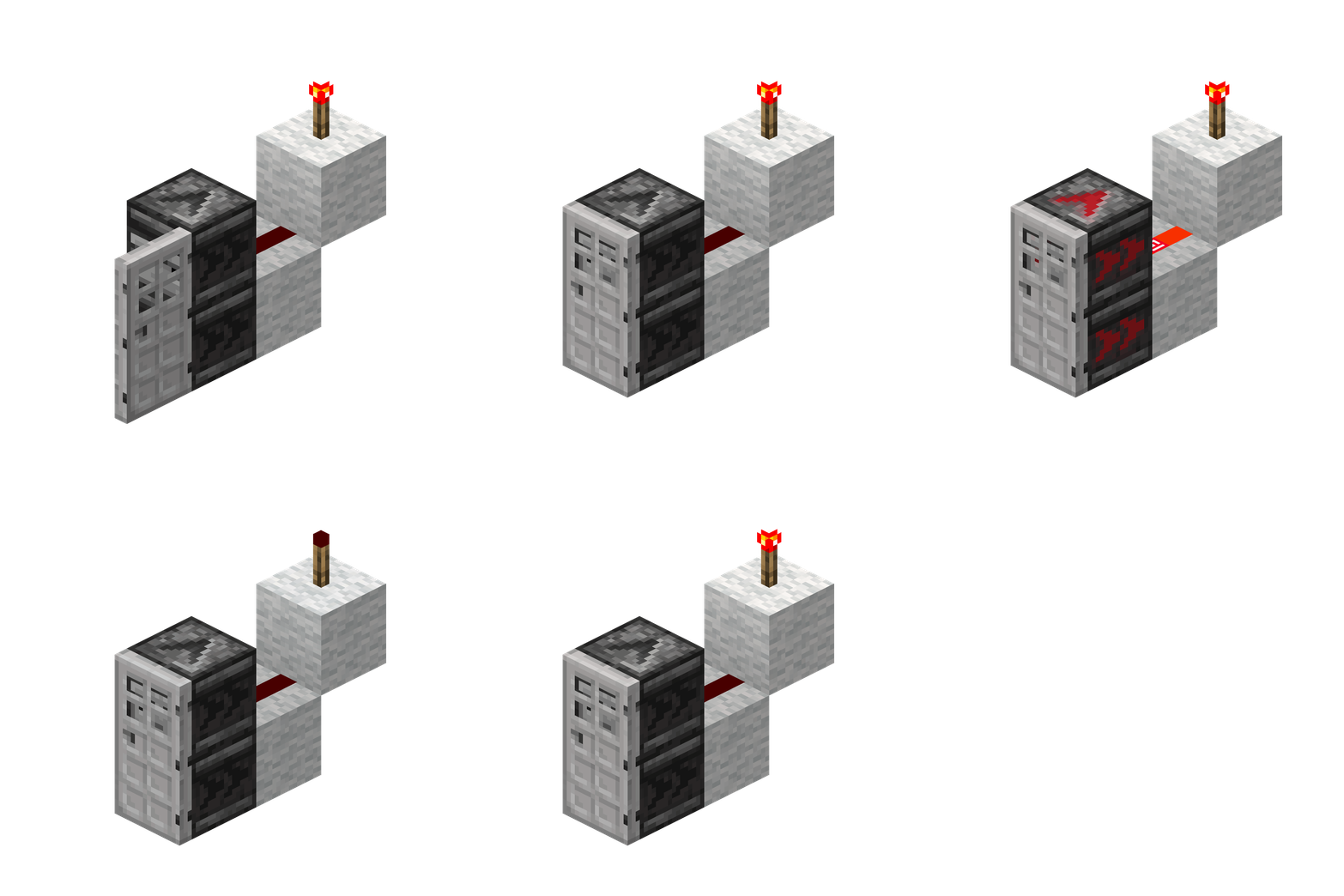
However, at this point we can discover a problem: if I place two observers, one observer used to "trigger" the redstone torch to add a Scheduled Tick, and another used to "continue" the redstone signal to turn off the torch, then can the redstone torch light up? Yes. A simple structure is shown in the figure below:
3.2 Can an Observer Make a Comparator Light Up?
3.3 What is an "End Always-On" Repeater?
4 Maintenance of Scheduled Tick Queues
In this section's explanation, we will omit some variables that have been declared but not called or are rarely involved.
To help readers follow the Scheduled Tick execution process more smoothly, we will first explain all important concepts and methods involved, then explain the execution logic of Scheduled Ticks. When reading, you can first get a preliminary understanding of these concepts and methods, then refer back when encountering difficulties in understanding the Scheduled Tick execution logic.
4.1 Basics
The Scheduled Ticks of the entire world are actually controlled by a World Tick Scheduler during execution. The Scheduled Ticks at each position are controlled by a Chunk Tick Scheduler of the corresponding chunk when being added and stored.8
4.2 Scheduled Tick Class
An object containing all information of a Scheduled Tick can be called a Scheduled Tick object. The Scheduled Tick class OrderedTick defines the properties and methods of Scheduled Tick objects. In addition to the five basic properties of block type type, coordinates pos, execution time triggerTick, priority priority, and sub-order subTickOrder, it also implements the following four methods:
4.2.1 Execution Time Comparison
First compare triggerTick values; if the same, then compare priority values; if still the same, then compare subTickOrder values.
This method implements the "priority" comparison in the priority queue of the Chunk-level Scheduler (see below).
4.2.2 Simple Comparison
Does not compare triggerTick values. Only compares priority values first; if the same, then compares subTickOrder values.
This method implements the "priority" comparison in the Chunk-level Scheduler priority queue of the World-level Scheduler (see below)
4.2.3 Hashing
Calculates the hash code of the Scheduled Tick object by operating on the hash codes of type and pos:
In Java, all hash codes are integers.
4.2.4 Fast Instantiation
In addition to the regular instantiation method, the Scheduled Tick class also implements a create method for temporarily creating a Scheduled Tick object based only on type and pos. Its other three properties are all 0. This temporary Scheduled Tick object is used to determine whether a Scheduled Tick for a certain block exists at a certain position.
4.3 Chunk-level Scheduler
The Chunk-level Scheduler manages the addition, "checking", and storage of Scheduled Ticks. It mainly maintains a priority queue (PriorityQueue) and a hash set (ObjectOpenCustomHashSet).
4.3.1 Adding Scheduled Ticks
Attempts to add the hashed Scheduled Tick to the hash set. If the addition is successful (i.e., the Scheduled Tick does not exist in the set), it simultaneously adds the Scheduled Tick object to the priority queue.
4.3.2 Scheduled Tick Storage
All hash codes of Scheduled Ticks are stored in the hash table of the Chunk-level Scheduler of the corresponding chunk, and all Scheduled Tick objects are stored in order in the priority queue of the Chunk-level Scheduler of the corresponding chunk.
The priority queue's sorting is based on Execution Time Comparison, meaning it considers triggerTick, priority, and subTickOrder simultaneously.
4.3.3 Access Next Tick peekNextTick
Or "access head Scheduled Tick". This method returns the Scheduled Tick object of the next Scheduled Tick to execute in the current chunk, i.e., the first Scheduled Tick in the priority queue.
4.3.4 Poll Next Tick pollNextTick
Or "poll head Scheduled Tick". This method attempts to poll the Scheduled Tick object of the next Scheduled Tick to execute in the current chunk. If polling is successful, it simultaneously deletes the hash code of that Scheduled Tick object from the hash table.
4.4 World-level Scheduler
The World-level Scheduler manages the "checking" and execution of Scheduled Ticks. During the Scheduled Tick execution phase, it coordinates all Chunk-level Schedulers, polls Scheduled Ticks according to specific logic, places them into the executable Scheduled Tick list, and finally executes them all together.
See Executing Scheduled Ticks.
4.5 Checking if a Scheduled Tick Exists
This method is what we commonly call "a certain component does not have a Scheduled Tick" or "a certain component does not have a Scheduled Tick for itself at the current position". It describes two core parameters: "a certain component" — block type type, "itself" "current position" — coordinates pos.
4.5.1 Method 1: Checking Method Controlled by Chunk-level Scheduler
This is the Adding Scheduled Ticks method described above. Adding a hashed Scheduled Tick to the hash set is actually a kind of "checking": if a Scheduled Tick for a certain block at a certain coordinate already exists in the hash set, when this block tries to add a Scheduled Tick at that location again, it will fail.
4.5.2 Method 2: Check if Scheduled Tick is "About to Execute" isTicking
This method is used to check whether a component will execute a Scheduled Tick in the current gt.
It receives two parameters: block type and coordinates. It first copies the queue of Scheduled Ticks that will execute in the current gt, then checks whether there is a Scheduled Tick with the same block type and coordinates in this queue.
When executing Scheduled Ticks, all executable Scheduled Ticks of the current tick (if the Scheduled Tick limit has not been reached) will be polled from the hash set and priority queue of each Chunk-level Scheduler (see Executing Scheduled Ticks below). That is to say, if a component will execute a Scheduled Tick in this gt, and it happens to try to add a Scheduled Tick before execution, then this addition behavior cannot be "intercepted" by Method 1.
Components such as repeaters, comparators, and redstone torches use this method to check if a Scheduled Tick is "about to execute" when adding Scheduled Ticks. Taking a repeater as an example, due to the effect of this method, if a repeater will light up at gt 2, then at gt 2, before the repeater lights up, since the repeater detects that it will execute a Scheduled Tick in the current gt, no matter how the signal changes, it will not add a Scheduled Tick. At gt 0 and gt 1, if the powered state of the repeater's input changes and the repeater receives an update, it will try to add a Scheduled Tick, but due to Method 1's "checking", this addition behavior will not succeed. So Method 1 and Method 2 together ensure that the repeater will not repeatedly add Scheduled Ticks before executing a Scheduled Tick.
4.5.3 Method 3: Check if Scheduled Tick is in Queue isQueued
This method is the "check if Scheduled Tick exists" method called by observers, and its actual function is completely identical to Method 1.
I really don't know what use it has other than possibly reducing lag.
——tanh_Heng
It receives two parameters: block type and coordinates. It first maps the coordinates to a chunk, then accesses the Chunk-level Scheduler corresponding to that chunk, then quickly instantiates a Scheduled Tick with the corresponding type and pos, and finally checks whether there is a Scheduled Tick with the same hash code as this temporary Scheduled Tick in the hash set.
Obviously, the fundamental difference from Method 2 is that this method does not check Scheduled Ticks that will execute in the current gt. This is the core principle of 4gt Observer high-frequency.
4.6 Executing Scheduled Ticks
Executing Scheduled Ticks is divided into three phases: collection (collect), execution (run), and cleanup (cleanup). The most important is the collection phase. In the collection phase, the World-level Scheduler adds Scheduled Ticks to the executable Scheduled Tick list (tickableTicks) according to the following steps:
4.6.1 Descriptive Explanation
Head Scheduled Tick of Chunk-level Scheduler: In the Chunk-level Scheduler, the Scheduled Tick at the front that will execute first.
All descriptions that do not explicitly state polling Scheduled Ticks are access methods.
Reached Scheduled Tick limit: The number of Scheduled Ticks that can be executed per gt in the game is limited. Reached Scheduled Tick limit means the number of Scheduled Ticks in the executable Scheduled Tick list is greater than or equal to the Scheduled Tick limit maxmaxTicks.
4.6.2 Step 1: Filter Executable Chunk-level Schedulers collectTickableChunkTickSchedulers
-
Scan all Chunk-level Schedulers (responsible for managing Scheduled Ticks within a single chunk). Only select those that:
- Have Scheduled Ticks waiting to execute internally (Scheduled Ticks exist).
- The execution time of the head Scheduled Tick in their queue is less than or equal to the current gt.
- The chunk corresponding to that Scheduled Tick meets loading requirements.
-
Put these qualified Chunk-level Schedulers into a priority queue, called the priority queue of executable Chunk-level Schedulers (
tickableChunkTickSchedulers, hereinafter referred to as the scheduler queue).
So, how does this priority queue sort? The queue sorts based on the head Scheduled Tick of each Chunk-level Scheduler. Sorting uses Simple Comparison (compared to the Execution Time Comparison of Chunk-level Scheduled Ticks, Simple Comparison does not consider the triggerTick property). This sorting mechanism is the key to implementing Scheduled Tick Suppressors later.
4.6.3 Step 2: Extract Executable Scheduled Ticks from Queue collectNextTicks
-
Poll the first scheduler: Poll a Chunk-level Scheduler from the front of the scheduler queue. We call it the current Chunk-level Scheduler.
-
Poll its first Scheduled Tick: Poll the head Scheduled Tick from the Scheduled Tick queue of the current Chunk-level Scheduler.
-
Mark as executable: Add this polled Scheduled Tick to the executable Scheduled Tick list, waiting for actual execution.
-
Attempt to continuously extract more Scheduled Ticks: Next, the game will try to continuously poll as many subsequent Scheduled Ticks as possible from the current Chunk-level Scheduler (as long as specific conditions are met):
-
Limit check: If the Scheduled Tick limit allowed for this processing has been reached, stop the entire continuous extraction process.
-
Access next scheduler in queue: Access the Chunk-level Scheduler at the front of the current scheduler queue (because the first scheduler has already been polled, this is the second scheduler in the original queue). We call it Chunk-level Scheduler 2.
-
Check if queue is non-empty: If the scheduler queue is not empty (i.e., successfully accessed Chunk-level Scheduler 2), then access the head Scheduled Tick of Chunk-level Scheduler 2.
-
Start continuous polling: If the Scheduled Tick limit has not been reached, loop through the following steps (5 and 6).
-
Look at the next Scheduled Tick of the current scheduler: Access the Scheduled Tick queue of the current Chunk-level Scheduler again, obtaining the Scheduled Tick currently at its front (same as step 2, because the first Scheduled Tick has already been polled, this is the one that was behind the original head Scheduled Tick).
-
Decide whether to poll (core condition):
- If the current Chunk-level Scheduler still has Scheduled Ticks (successfully accessed its current head Scheduled Tick),
- And this Scheduled Tick also needs to execute in the current game tick (gt),
- And using the Simple Comparison rule, this Scheduled Tick of the current Chunk-level Scheduler has an earlier execution time than the head Scheduled Tick of Chunk-level Scheduler 2,
- Then poll this Scheduled Tick from the current Chunk-level Scheduler and add it to the executable Scheduled Tick list.
- If any of the above conditions is not met (no more Scheduled Ticks, not executing in current gt, or not earlier than the next scheduler's Scheduled Tick in the queue), exit this continuous extraction loop, i.e., no longer attempt to continuously extract more Scheduled Ticks.
-
-
Handle unfinished schedulers: When the continuous extraction loop of step 4 ends, it means that temporarily no more Scheduled Ticks meeting the conditions can be continuously polled from the current Chunk-level Scheduler. At this time, check:
- If the current Chunk-level Scheduler still has Scheduled Ticks that have not been polled (queue not empty),
- And its current front Scheduled Tick (new head Scheduled Tick) still needs to execute in the current game tick (gt),
- And the entire processing has not reached the Scheduled Tick limit,
- Then re-add the current Chunk-level Scheduler to the scheduler queue (re-sorted according to the execution priority of its new head Scheduled Tick), waiting for subsequent processing again.
-
Loop through the above steps (steps 1 to 5) until the Scheduled Tick limit is reached or the scheduler queue is empty.
In summary:
The game first filters out all Chunk-level Schedulers that have Scheduled Ticks to execute in the current gt and whose chunks are loaded, then queues them according to the Simple Comparison order of their most prioritized Scheduled Tick (head Scheduled Tick). Next, it polls a Chunk-level Scheduler from the queue head, adds its most prioritized Scheduled Tick to the ready-to-execute queue, and attempts to "continuously" extract more tasks from this scheduler that also execute in the current gt and are more prioritized than the most prioritized Scheduled Tick of the next scheduler in the queue, adding them to the ready-to-execute queue together (to improve efficiency). If continuous extraction is interrupted (e.g., the next Scheduled Tick is not prioritized enough, or the execution limit is reached), and this chunk still has Scheduled Ticks for the current gt that have not been added and the limit has not been exceeded, the current scheduler is put back into the scheduler queue according to the priority order of its head Scheduled Tick, so that it can continue processing its remaining tasks later.
4.6.4 Step 3: Delay Unadded Chunk-level Schedulers delayAllTicks
Add all Chunk-level Schedulers in the scheduler queue that have not yet been polled to a chunk coordinates -> next execution time mapping table (nextTriggerTickByChunkPos) for subsequent execution.
4.7 Scheduled Tick Suppressors
From the logic of executing Scheduled Ticks, we can notice: the sorting of Chunk-level Schedulers does not consider triggerTick. That is to say, if the head Scheduled Tick of a certain Chunk-level Scheduler or several Chunk-level Schedulers has sufficiently high priority, and the number of Scheduled Ticks in that scheduler is sufficiently large, the World-level Scheduler can continuously poll Scheduled Ticks only from these few schedulers until the Scheduled Tick limit is reached, without polling Scheduled Ticks from other schedulers. And this suppressor can only take effect on chunks other than the one where the suppressor is located.
For example, if repeaters are activated at a certain high frequency in certain chunks, components with priority 0 in other chunks will be "suppressed" during the high-frequency period, such as comparators not lighting up or Observer high-frequency not working. These Scheduled Ticks will only execute again once the high-frequency period ends.
Footnotes
-
"How long to delay before execution" is not strictly accurate. In reality, the execution time records the world tick, "delay
xgt" meansexecution time world tick = current world tick + x. Whencurrent world tick >= execution time world tick, the Scheduled Tick executes. However, this distinction does not affect Scheduled Tick analysis in most cases, except for chunk unloading situations. ↩ -
However, there are currently no Scheduled Ticks with priority 1, 2, or 3. They are only declared in the code. ↩
-
The basic section only provides a simple description here. For specific content involving Scheduled Tick queue maintenance, see the advanced section. ↩
-
Because in the source code, they inherit from the same abstract base class
AbstractRedstoneGateBlock↩ -
To be precise, it should be "a signal that turns off before the repeater executes its Scheduled Tick (to light up)". ↩
-
Due to the Scheduled Tick execution logic, Scheduled Ticks that are about to execute in the current gt are not considered as "having a Scheduled Tick". That is, if an observer will light up in a certain gt, and a PP update is sent to the observer before it lights up, the observer will also add a Scheduled Tick. This logic is the core principle of 4gt Observer high-frequency. Specific behavior and examples are detailed in the advanced section. ↩
-
This turning off is controlled through
WorldEvent(world event), rather than directly callingsetblockstate. ↩ -
World Tick Scheduler and Chunk Tick Scheduler are terms directly copied from class name in yarn mapping. ↩